ProjectInfo
ProjectInfo
Client
Client
ProjectInfo
ProjectInfo
Role
Role
Lead Product Designer
Lead Product Designer
Year
Year
2024
2024
Project Info B2B/B2C SaaS - Simplifying ITSM operations with a unified & streamlined IT Field Management platform.
Project Info B2B/B2C SaaS - Simplifying ITSM operations with a unified & streamlined IT Field Management platform.
Project Info B2B/B2C SaaS - Simplifying ITSM operations with a unified & streamlined IT Field Management platform.
Team
Team
Product Manager • 5 Software Engineers • Lead Product Designer (Me)
Product Manager • 5 Software Engineers • Lead Product Designer (Me)
Responsibilities
Responsibilities
Product Discovery • Stakeholder Research • Product Strategy • Information Architecture • UX/UI Design • Design System • Prototyping • Usability Testing • Cross-functional Collaboration • AI optimised Design - Dev Workflows
Product Discovery • Stakeholder Research • Product Strategy • Information Architecture • UX/UI Design • Design System • Prototyping • Usability Testing • Cross-functional Collaboration • AI optimised Design - Dev Workflows
Impact
Impact
• 30% reduction in time to locate critical project information during usability testing • 25% faster completion of core project management tasks through simplified workflows • Reduced navigation complexity by consolidating key project tools into a unified workspace • 25% faster design-to-development iterations through a reusable design system
• 30% reduction in time to locate critical project information during usability testing • 25% faster completion of core project management tasks through simplified workflows • Reduced navigation complexity by consolidating key project tools into a unified workspace • 25% faster design-to-development iterations through a reusable design system
Overview
Overview
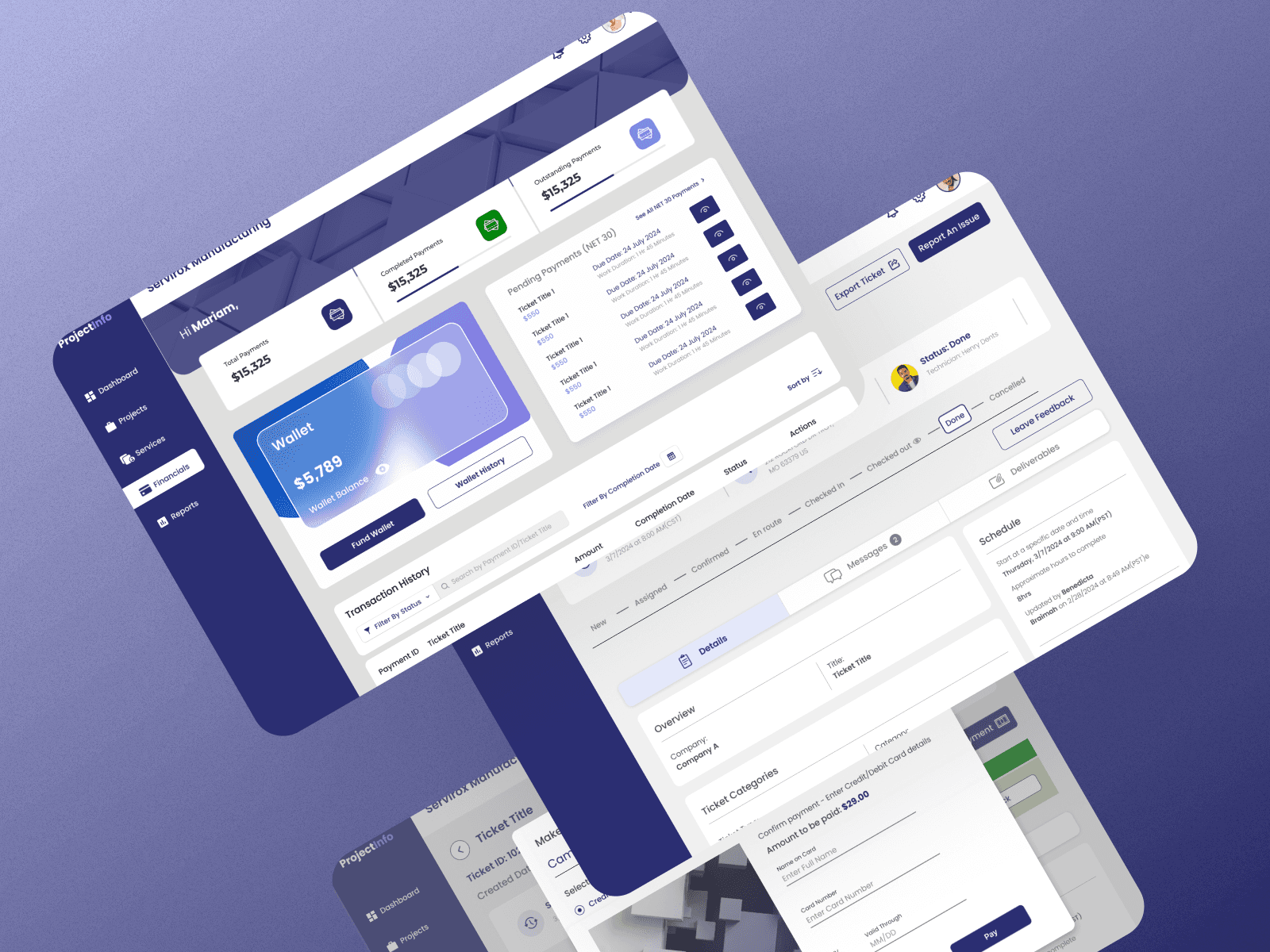
The Problem: The Client was struggling with managing their IT operations and field staff in an automated manner as most of their processes were majorly manual which often resulted in several operational bottlenecks. They were looking to build a cloud based web application with an admin dashboard that will enable them to effectively manage their technicians, streamline their field operations, enhance customer satisfaction, and stay competitive in a rapidly evolving industry. What was the challenge? IT Field management teams often struggle with scattered data, inefficient communication, and real-time task coordination, particularly in industries with distributed workforces. ProjectInfo aimed to address these challenges by providing a streamlined, user-friendly SaaS application designed to optimize field operations, improve reporting accuracy, and enhance resource management. Who was it for? ProjectInfo was created specifically for IT field managers, technicians, and operational teams in sectors such as IT service management, construction, maintenance, and logistics, where efficient task coordination is critical for success. What were the goals? The primary objective was to create an intuitive platform that: - Consisted of an Admin portal, Mobile App for Field Technicians, as well as a Customer portal for Customers requesting IT support services. - Simplified ticket and task assignment and tracking. - Enabled real-time communication between field and office teams. - Supported offline functionality for areas with limited connectivity. - Provided comprehensive reporting tools to enhance decision-making. My Role: As Lead Product Designer, I worked end to end on all design deliverables; from user research, designs documentation (user stories/user flows/information architecture), wireframes to high fidelity interactive prototypes, helping create and manage a comprehensive components library ensuring consistency in UI interfaces across web/mobile screens, ensuring effective design - dev collaboration with a dedicated product team to design and develop a robust web application that worked seamlessly across both web and mobile interfaces, as well as crafting the mobile app designs and prototype for field technicians which would also be integrated into the product.
The Problem: The Client was struggling with managing their IT operations and field staff in an automated manner as most of their processes were majorly manual which often resulted in several operational bottlenecks. They were looking to build a cloud based web application with an admin dashboard that will enable them to effectively manage their technicians, streamline their field operations, enhance customer satisfaction, and stay competitive in a rapidly evolving industry. What was the challenge? IT Field management teams often struggle with scattered data, inefficient communication, and real-time task coordination, particularly in industries with distributed workforces. ProjectInfo aimed to address these challenges by providing a streamlined, user-friendly SaaS application designed to optimize field operations, improve reporting accuracy, and enhance resource management. Who was it for? ProjectInfo was created specifically for IT field managers, technicians, and operational teams in sectors such as IT service management, construction, maintenance, and logistics, where efficient task coordination is critical for success. What were the goals? The primary objective was to create an intuitive platform that: - Consisted of an Admin portal, Mobile App for Field Technicians, as well as a Customer portal for Customers requesting IT support services. - Simplified ticket and task assignment and tracking. - Enabled real-time communication between field and office teams. - Supported offline functionality for areas with limited connectivity. - Provided comprehensive reporting tools to enhance decision-making. My Role: As Lead Product Designer, I worked end to end on all design deliverables; from user research, designs documentation (user stories/user flows/information architecture), wireframes to high fidelity interactive prototypes, helping create and manage a comprehensive components library ensuring consistency in UI interfaces across web/mobile screens, ensuring effective design - dev collaboration with a dedicated product team to design and develop a robust web application that worked seamlessly across both web and mobile interfaces, as well as crafting the mobile app designs and prototype for field technicians which would also be integrated into the product.
The Problem: The Client was struggling with managing their IT operations and field staff in an automated manner as most of their processes were majorly manual which often resulted in several operational bottlenecks. They were looking to build a cloud based web application with an admin dashboard that will enable them to effectively manage their technicians, streamline their field operations, enhance customer satisfaction, and stay competitive in a rapidly evolving industry. What was the challenge? IT Field management teams often struggle with scattered data, inefficient communication, and real-time task coordination, particularly in industries with distributed workforces. ProjectInfo aimed to address these challenges by providing a streamlined, user-friendly SaaS application designed to optimize field operations, improve reporting accuracy, and enhance resource management. Who was it for? ProjectInfo was created specifically for IT field managers, technicians, and operational teams in sectors such as IT service management, construction, maintenance, and logistics, where efficient task coordination is critical for success. What were the goals? The primary objective was to create an intuitive platform that: - Consisted of an Admin portal, Mobile App for Field Technicians, as well as a Customer portal for Customers requesting IT support services. - Simplified ticket and task assignment and tracking. - Enabled real-time communication between field and office teams. - Supported offline functionality for areas with limited connectivity. - Provided comprehensive reporting tools to enhance decision-making. My Role: As Lead Product Designer, I worked end to end on all design deliverables; from user research, designs documentation (user stories/user flows/information architecture), wireframes to high fidelity interactive prototypes, helping create and manage a comprehensive components library ensuring consistency in UI interfaces across web/mobile screens, ensuring effective design - dev collaboration with a dedicated product team to design and develop a robust web application that worked seamlessly across both web and mobile interfaces, as well as crafting the mobile app designs and prototype for field technicians which would also be integrated into the product.
Client
Client
ProjectInfo
ProjectInfo
Industry
Industry
IT Service Management
IT Service Management
Service
Service
Product Design
Product Design
B2B/B2C SaaS design
B2B/B2C SaaS design
Product Thinking
Product Thinking
Product Design
Product Design
Interactive Prototyping
Interactive Prototyping
Duration
Duration
6 Weeks
6 Weeks


The Challenge
The Challenge
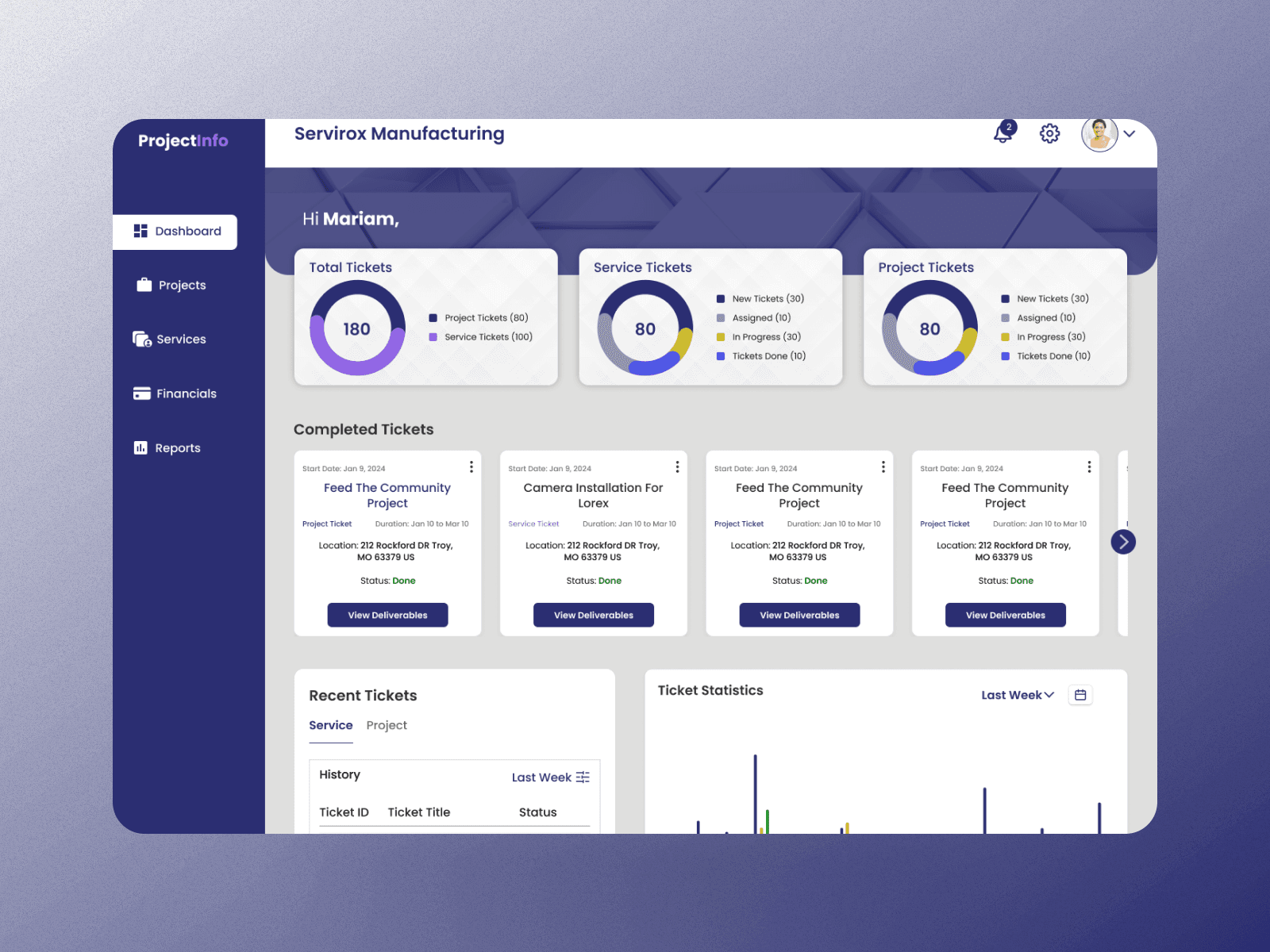
IT Field management teams often struggle with scattered data, inefficient communication, and real-time task coordination, particularly in industries with distributed workforces. ProjectInfo aimed to address these challenges by providing a streamlined, user-friendly SaaS application designed to optimize field operations, improve reporting accuracy, and enhance resource management.
IT Field management teams often struggle with scattered data, inefficient communication, and real-time task coordination, particularly in industries with distributed workforces. ProjectInfo aimed to address these challenges by providing a streamlined, user-friendly SaaS application designed to optimize field operations, improve reporting accuracy, and enhance resource management.
IT Field management teams often struggle with scattered data, inefficient communication, and real-time task coordination, particularly in industries with distributed workforces. ProjectInfo aimed to address these challenges by providing a streamlined, user-friendly SaaS application designed to optimize field operations, improve reporting accuracy, and enhance resource management.
Product Discovery & Design Strategy
Product Discovery & Design Strategy
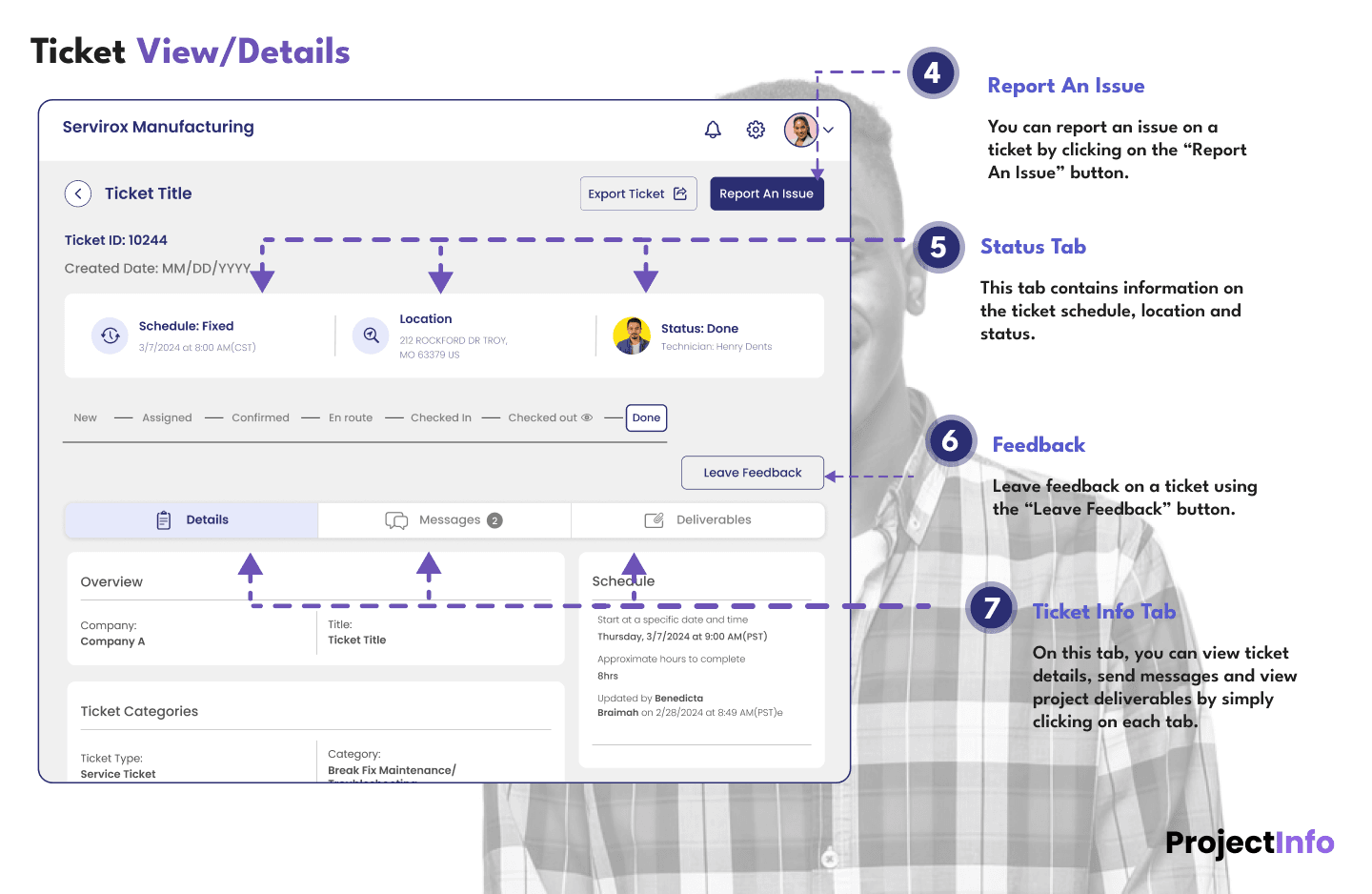
Research and Insights - I partnered with the Product Manager on 1st level discussions with the client to understand the high level challenge and business requirements, after which I carried out exhaustive and interactive Product Discovery sessions with the client where I clearly identified the client’s pain points, core features required, what needed to be built, the operational users of the application and which tasks each unit would perform on the app, how it should be constructed, the type and format of information presentation and the optimal sequence for implementation. All these insights were properly captured in a Confluence Product Requirements Document that was owned and managed by the product team. 1. User Research To understand user needs, I conducted extensive interviews with the core users of the app (majorly the client's operational staff) - Field managers, Project coordinators, Technicians and Customers. Key pain points included: - Difficulty accessing accurate, up-to-date task information. - Inefficient manual reporting processes. - Lack of transparency in terms of real-time status updates on service requests/tickets. - Poor usability of existing tools, particularly on mobile devices. 2. Competitive Analysis I evaluated existing IT field management solutions and identified gaps such as limited offline functionality, overly complex interfaces, lengthy ticket creation processses and lack of integration with third-party tools. This analysis informed my design priorities. 3. Key Findings - Users valued simplicity and ease of use over feature-rich but complex platforms. - Offline access and automatic synchronization were critical for field operations. - Ticket/Task creation workflows needed to be streamlined and smarter. - Customizable dashboards and workflows were essential to accommodate diverse use cases. --------------------------------------------------- Design Process - 1. Ideation I began by using Whimsical to map out the user journey/user flows and creating personas for each user category to align the design with user needs and identified user stories. I engaged in collaborative brainstorming sessions with the Product Owner focused on simplifying complex workflows and integrating features like streamlined ticket creation and assignment, GPS tracking for tasks, and real-time updates. 2. Wireframes & Prototypes Low-fidelity wireframes were developed using Figma to outline key features, as well as the Information Architecture for navigating the app. Based off these, I was able to design the 1st draft of low fidelity designs which were reviewed and amended with feedback from the business users, the client and stakeholders until a final version was achieved and approved, then I proceeded with the high-fidelity designs and interactive prototypes to simulate real-world usage. Feedback from early usability testing sessions helped refine the layout and navigation. In this phase I also created the design system and re-usable design components (leveraging atomic design libraries like Tailwind CSS, Hope UI and Ant design) for future iterations, after which I worked collaboratively with our Dev Team utilizing tools like Figma Dev Mode to ensure that the designs were effectively implemented. 3. Iterative Testing Through multiple rounds of usability testing, I gathered insights from end-users and stakeholders. Key improvements made included: - Enhancing the clarity of ticket management flows and task assignments with color-coded priority indicators. - Introduction of a messaging feature on tickets for real-time communication between managers and field technicians. - Simplifying navigation by consolidating related features into intuitive tabs. - Optimizing the technician mobile interface for one-handed use, and introduction of real-time indicators on the mobile app.
Research and Insights - I partnered with the Product Manager on 1st level discussions with the client to understand the high level challenge and business requirements, after which I carried out exhaustive and interactive Product Discovery sessions with the client where I clearly identified the client’s pain points, core features required, what needed to be built, the operational users of the application and which tasks each unit would perform on the app, how it should be constructed, the type and format of information presentation and the optimal sequence for implementation. All these insights were properly captured in a Confluence Product Requirements Document that was owned and managed by the product team. 1. User Research To understand user needs, I conducted extensive interviews with the core users of the app (majorly the client's operational staff) - Field managers, Project coordinators, Technicians and Customers. Key pain points included: - Difficulty accessing accurate, up-to-date task information. - Inefficient manual reporting processes. - Lack of transparency in terms of real-time status updates on service requests/tickets. - Poor usability of existing tools, particularly on mobile devices. 2. Competitive Analysis I evaluated existing IT field management solutions and identified gaps such as limited offline functionality, overly complex interfaces, lengthy ticket creation processses and lack of integration with third-party tools. This analysis informed my design priorities. 3. Key Findings - Users valued simplicity and ease of use over feature-rich but complex platforms. - Offline access and automatic synchronization were critical for field operations. - Ticket/Task creation workflows needed to be streamlined and smarter. - Customizable dashboards and workflows were essential to accommodate diverse use cases. --------------------------------------------------- Design Process - 1. Ideation I began by using Whimsical to map out the user journey/user flows and creating personas for each user category to align the design with user needs and identified user stories. I engaged in collaborative brainstorming sessions with the Product Owner focused on simplifying complex workflows and integrating features like streamlined ticket creation and assignment, GPS tracking for tasks, and real-time updates. 2. Wireframes & Prototypes Low-fidelity wireframes were developed using Figma to outline key features, as well as the Information Architecture for navigating the app. Based off these, I was able to design the 1st draft of low fidelity designs which were reviewed and amended with feedback from the business users, the client and stakeholders until a final version was achieved and approved, then I proceeded with the high-fidelity designs and interactive prototypes to simulate real-world usage. Feedback from early usability testing sessions helped refine the layout and navigation. In this phase I also created the design system and re-usable design components (leveraging atomic design libraries like Tailwind CSS, Hope UI and Ant design) for future iterations, after which I worked collaboratively with our Dev Team utilizing tools like Figma Dev Mode to ensure that the designs were effectively implemented. 3. Iterative Testing Through multiple rounds of usability testing, I gathered insights from end-users and stakeholders. Key improvements made included: - Enhancing the clarity of ticket management flows and task assignments with color-coded priority indicators. - Introduction of a messaging feature on tickets for real-time communication between managers and field technicians. - Simplifying navigation by consolidating related features into intuitive tabs. - Optimizing the technician mobile interface for one-handed use, and introduction of real-time indicators on the mobile app.
Research and Insights - I partnered with the Product Manager on 1st level discussions with the client to understand the high level challenge and business requirements, after which I carried out exhaustive and interactive Product Discovery sessions with the client where I clearly identified the client’s pain points, core features required, what needed to be built, the operational users of the application and which tasks each unit would perform on the app, how it should be constructed, the type and format of information presentation and the optimal sequence for implementation. All these insights were properly captured in a Confluence Product Requirements Document that was owned and managed by the product team. 1. User Research To understand user needs, I conducted extensive interviews with the core users of the app (majorly the client's operational staff) - Field managers, Project coordinators, Technicians and Customers. Key pain points included: - Difficulty accessing accurate, up-to-date task information. - Inefficient manual reporting processes. - Lack of transparency in terms of real-time status updates on service requests/tickets. - Poor usability of existing tools, particularly on mobile devices. 2. Competitive Analysis I evaluated existing IT field management solutions and identified gaps such as limited offline functionality, overly complex interfaces, lengthy ticket creation processses and lack of integration with third-party tools. This analysis informed my design priorities. 3. Key Findings - Users valued simplicity and ease of use over feature-rich but complex platforms. - Offline access and automatic synchronization were critical for field operations. - Ticket/Task creation workflows needed to be streamlined and smarter. - Customizable dashboards and workflows were essential to accommodate diverse use cases. --------------------------------------------------- Design Process - 1. Ideation I began by using Whimsical to map out the user journey/user flows and creating personas for each user category to align the design with user needs and identified user stories. I engaged in collaborative brainstorming sessions with the Product Owner focused on simplifying complex workflows and integrating features like streamlined ticket creation and assignment, GPS tracking for tasks, and real-time updates. 2. Wireframes & Prototypes Low-fidelity wireframes were developed using Figma to outline key features, as well as the Information Architecture for navigating the app. Based off these, I was able to design the 1st draft of low fidelity designs which were reviewed and amended with feedback from the business users, the client and stakeholders until a final version was achieved and approved, then I proceeded with the high-fidelity designs and interactive prototypes to simulate real-world usage. Feedback from early usability testing sessions helped refine the layout and navigation. In this phase I also created the design system and re-usable design components (leveraging atomic design libraries like Tailwind CSS, Hope UI and Ant design) for future iterations, after which I worked collaboratively with our Dev Team utilizing tools like Figma Dev Mode to ensure that the designs were effectively implemented. 3. Iterative Testing Through multiple rounds of usability testing, I gathered insights from end-users and stakeholders. Key improvements made included: - Enhancing the clarity of ticket management flows and task assignments with color-coded priority indicators. - Introduction of a messaging feature on tickets for real-time communication between managers and field technicians. - Simplifying navigation by consolidating related features into intuitive tabs. - Optimizing the technician mobile interface for one-handed use, and introduction of real-time indicators on the mobile app.

The Solution
The Solution
Design Solution - The final product featured: - Ticket Management: A centralized dashboard for creating, assigning, and tracking tickets. - Real-Time Communication: Built-in messaging and notification features to keep teams connected. - Offline Mode: Seamless offline access with automatic synchronization once connectivity is restored. - Automated Ticket Assignment: Automated ticket assignment to field technicians based on location and relevant skills and experience mapping - Customizable Reports: Easy-to-generate reports tailored to organizational needs.
Design Solution - The final product featured: - Ticket Management: A centralized dashboard for creating, assigning, and tracking tickets. - Real-Time Communication: Built-in messaging and notification features to keep teams connected. - Offline Mode: Seamless offline access with automatic synchronization once connectivity is restored. - Automated Ticket Assignment: Automated ticket assignment to field technicians based on location and relevant skills and experience mapping - Customizable Reports: Easy-to-generate reports tailored to organizational needs.
Design Solution - The final product featured: - Ticket Management: A centralized dashboard for creating, assigning, and tracking tickets. - Real-Time Communication: Built-in messaging and notification features to keep teams connected. - Offline Mode: Seamless offline access with automatic synchronization once connectivity is restored. - Automated Ticket Assignment: Automated ticket assignment to field technicians based on location and relevant skills and experience mapping - Customizable Reports: Easy-to-generate reports tailored to organizational needs.

The Result
The Result
Results Achieved - - Efficiency Gains: Field teams reported a 30% reduction in task completion time due to improved coordination. - Adoption Rates: Over 90% of users reported satisfaction with the platform’s ease of use and functionality. - Operational Savings: The automated reporting features reduced administrative overhead by 25%. Reflection and Takeaways - The development of ProjectInfo underscored the importance of balancing technical constraints with user-centric design. Key lessons included: - Prioritizing core functionalities before exploring advanced features. - Involving end-users throughout the design process to ensure alignment with their needs. - Continuously iterating based on real-world feedback to maintain relevance and usability.
Results Achieved - - Efficiency Gains: Field teams reported a 30% reduction in task completion time due to improved coordination. - Adoption Rates: Over 90% of users reported satisfaction with the platform’s ease of use and functionality. - Operational Savings: The automated reporting features reduced administrative overhead by 25%. Reflection and Takeaways - The development of ProjectInfo underscored the importance of balancing technical constraints with user-centric design. Key lessons included: - Prioritizing core functionalities before exploring advanced features. - Involving end-users throughout the design process to ensure alignment with their needs. - Continuously iterating based on real-world feedback to maintain relevance and usability.
Results Achieved - - Efficiency Gains: Field teams reported a 30% reduction in task completion time due to improved coordination. - Adoption Rates: Over 90% of users reported satisfaction with the platform’s ease of use and functionality. - Operational Savings: The automated reporting features reduced administrative overhead by 25%. Reflection and Takeaways - The development of ProjectInfo underscored the importance of balancing technical constraints with user-centric design. Key lessons included: - Prioritizing core functionalities before exploring advanced features. - Involving end-users throughout the design process to ensure alignment with their needs. - Continuously iterating based on real-world feedback to maintain relevance and usability.

PORTFOLIO
CHECK OUT SOME MORE
CHECK OUT SOME MORE
NEMTIFY
UX Research & Design
Product Documentation
Product Discovery
Figma
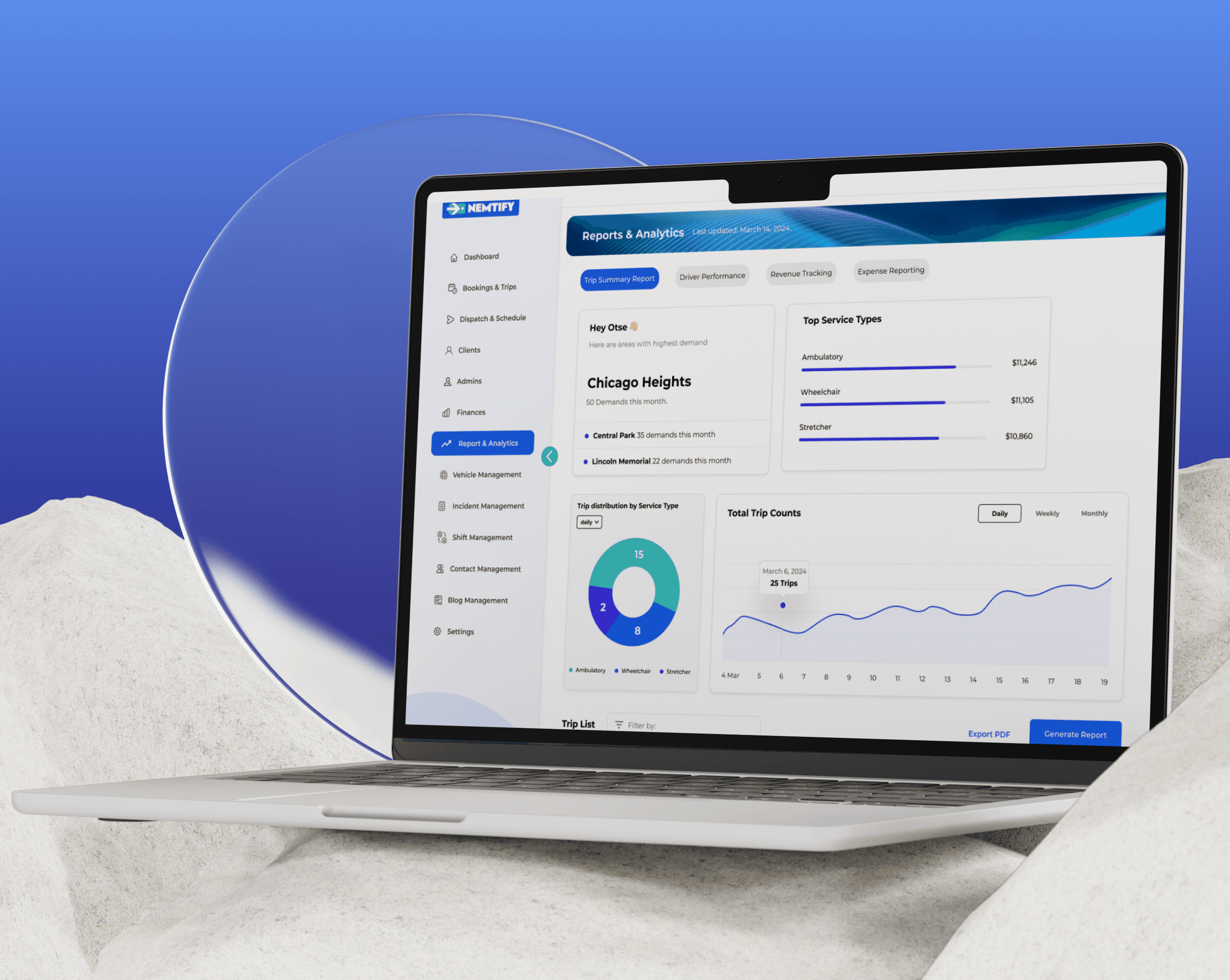
B2B SaaS for Medical Transportation Service Operators
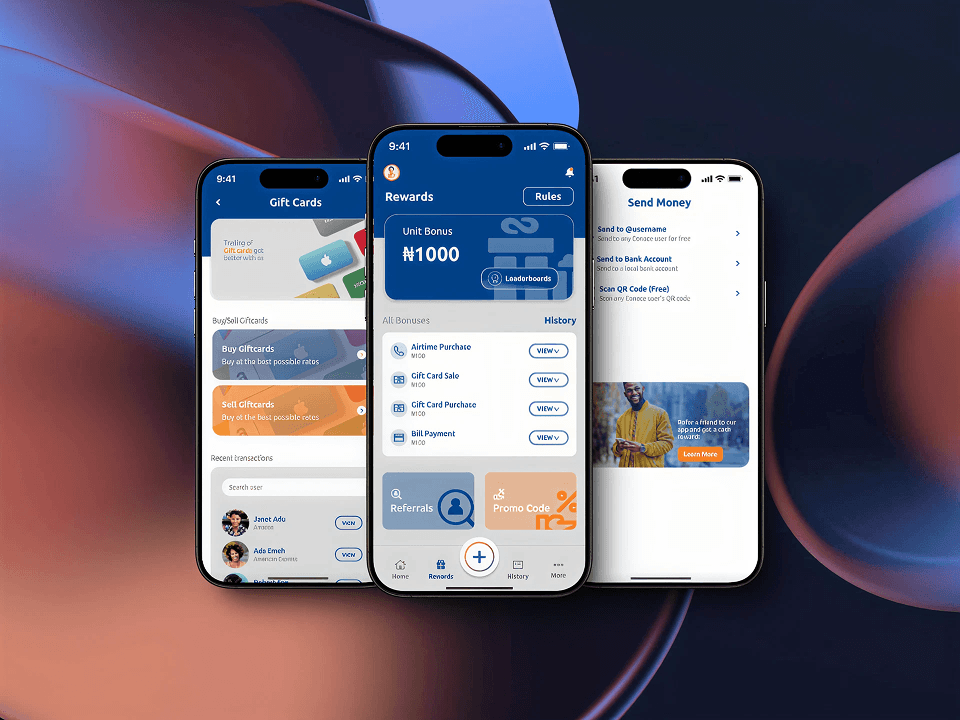
Eonace
UX/UI Design
Mobile App Design
Figma
Interactive Prototyping
Fintech App Design
HAVE A PROJECT
IN MIND ?